 |
| Microsoft Surface Book - The Ultimate Laptop |
Microsoft Surface Book is the first Microsoft laptop which fits what you are looking for, other models released such as The Surface Pro 4 which designed to be
tablet first then laptop second, but The Surface Book designed as a laptop
first then tablet second and The Surface 3 which the smallest and compact
model.
Microsoft Surface Book Price
Prices range Starting at $1,499 up to $2,499 so it’s not an excessive
budget but it’s really more expensive than some other laptops such as the
MacBook Pro which will cost you $1199 for the 13" model with 8GB of RAM,
2.5GHz dual-core Intel Core i5 and 128GB storage.
Although the Surface Book Price is high but it’s features worth, so it comes with the surface pen also the ability to detach the screen from the keyboard to be used as a tablet. The keyboard also has an extra battery can be used separately from the main power.
Microsoft Surface Book Design
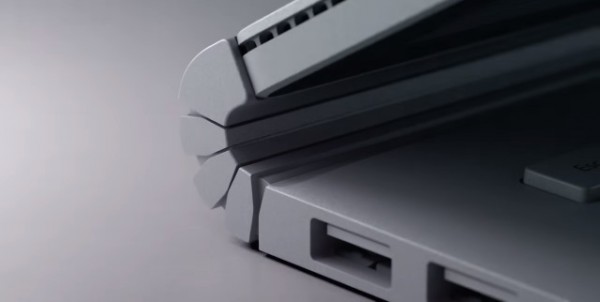 |
| Microsoft Surface Book - The Dynamic Fulcrum Hinge |
Surface book has a little unusual shape and it’s screen has
a 3:2 aspect ratio. The surface book outer case is made from magnesium alloy,
which is lighter and durable than aluminum. The surface book comes in two
parts, the tablet element 724g and the keyboard dock 860g so it weighs a 1.58kg.
The Dynamic Fulcrum Hinge is the most fantastic part of the
design which supports the surface book balance also the hinge is stiff enough
to prevent the tablet section wobbles when using the touch screen. The surface
book can be shut securely using some magnets which attach the tablet to the
keyboard firmly also the device can be opened up with one hand. There’s a gap
between the screen glass and the keyboard keys to prevent any scratches or
marks on the screen by the keys. The Tablet is cooled by a small gap around it’s
edge. Unfortunately there are no USB ports on the tablet section. The surface
pen can be attached to the side of the Surface Book magnetically.
Microsoft Surface Book Performance
 |
| Microsoft Surface Book "Tablet section" |
The surface book screen size is 13.5in PixelSense display has
a resolution: 3000x2000 pixels It’s a fantastic screen with perfect viewing
angles. The devices uses a “negative photo-aligned liquid oxide Display” technique
which increases contrast and image quality and already used in TVs and the
iPhone 6, but the display unfortunately is very reflective on the surface book.
Core i5 & Core i7 models
Mainly Core i5 models come with 8GB of RAM and you can
double the storage and the video card “nVidia” GPU by paying extra $350. On
Core i7 you can get the discrete graphics for any model you choose, so you can
get 8GB of RAM with 256GB or doubled to 16GB and 513GB.
Microsoft Surface Book Ports
You get two full-size USB 3.0 sockets, an Ultra-High Speed
Full-size SD card reader and Mini-Display Port, but all of these ports on the
keyboard dock and the only port on the tablet section is the Headset jack, also
offers an 8Mp rear camera and a 5Mp front facing webcam, 11ac Wi-Fi, Bluetooth
4.0., dual microphones and the front-facing speakers with Dolby audio, which sound
great at normal sound level.
Microsoft Surface Book GPU
The Surface Book when used as a laptop then the custom
GeForce GPU is supporting, but when the tablet detached away from the keyboard
then the integrated Intel HD Graphics will be using. Surface book supports
gaming, heavy workloads and video editing.
Microsoft Surface Book’ Surface Pen
 |
| Surface Book Tips |
The Surface Pen has a place to call home by forcing it in a
fabric loop on the keyboard side. Surface Pen has a good pressure sensitivity sufficient
for most users, also has a right-click button on it’s side and an eraser on the
end. Pressing and holding on the top brings help assistant. Surface pen has
different tips according to the application such as writing, drawing &
shading, sketching and note taking.
Verdict
Microsoft Surface Book is amazing efficient piece of
technology but expensive.

No comments:
Post a Comment